How to Store Camera Gear on Shelves
As an Amazon Associate we earn from qualifying purchases.
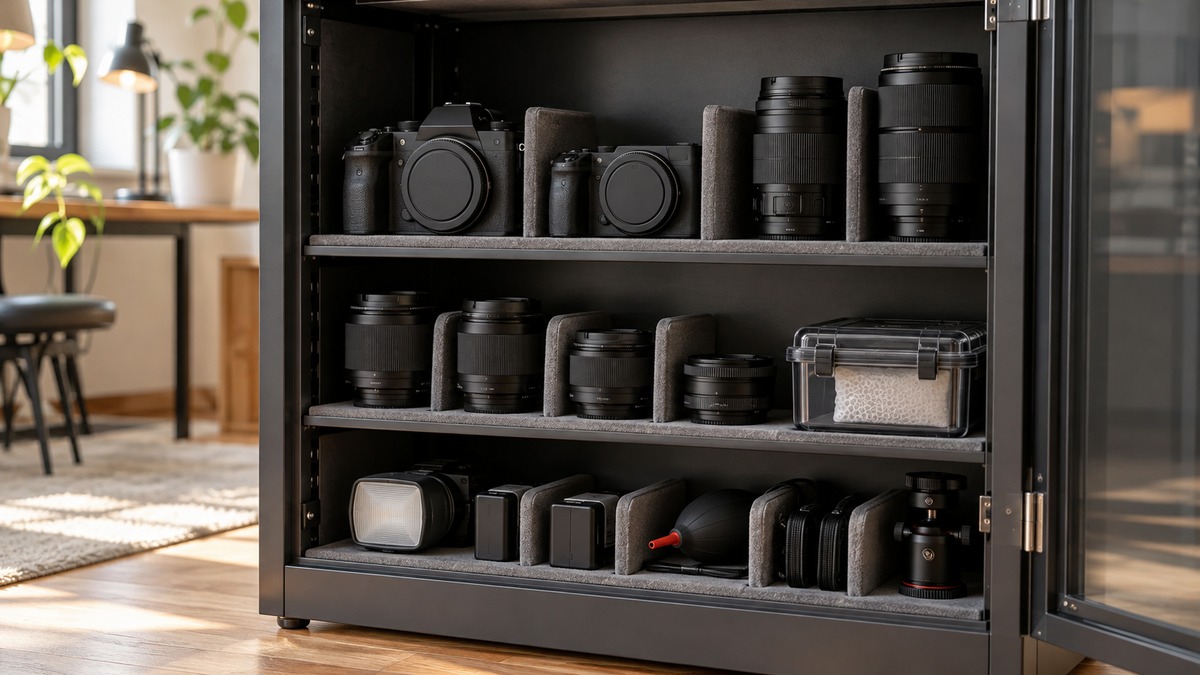
How to store camera gear on shelves comes down to the room as much as the shelf. Camera makers say to keep bodies and lenses in a dry, well-ventilated place, below 60 percent relative humidity, away from direct sun, heat, and strong magnetic fields. Their manuals also say to take the battery out for long storage, keep caps on, and check the gear now and then. This guide turns those manual rules into a shelf plan, adds the shelf-safety rules for heavy gear, and shows where the manufacturers disagree or stop.
Quick answer
- Choose a dry, well-ventilated spot. Nikon’s manuals say to avoid places poorly ventilated or at humidity over 60 percent, and the EPA also says to keep indoor humidity below 60 percent.
- Remove batteries for long storage and keep the terminal cover on. Nikon and Canon both say so.
- Keep lens caps on, and keep gear out of direct sunlight and away from televisions, speakers and magnets.
- Put heavy gear between knee and shoulder height and do not overload the shelf, as a University of Oregon safety sheet advises.
- Check the gear on a schedule. Canon says to press the shutter now and then in storage, and Nikon’s P1100 manual says to take the camera out at least once a month.
What the makers say about the room
Camera manuals are the best sources for this topic because they are written for the device itself. The Nikon D850 manual says to store the camera in a dry, well-ventilated area to prevent mold or mildew. It lists three places to avoid: poorly ventilated spots or those with humidity over 60 percent, spots next to equipment that makes strong electromagnetic fields such as televisions or radios, and spots above 50 °C (122 °F) or below −10 °C (14 °F). It also says not to store a camera with naphtha or camphor moth balls.
Canon’s handling precautions for the EOS R3 say the same in different words. If the camera will not be used for an extended period, remove the battery and store it in a cool, dry, well-ventilated location. Canon adds that you should avoid places with chemicals that cause rust and corrosion, such as a chemical lab, and never leave the camera near anything with a strong magnetic field, such as a magnet or electric motor. The Canon card section lists a television and speakers among the things to keep cards away from.
Where the numbers agree and differ
The EPA guide to mold and moisture is not about cameras, but its humidity advice gives an independent check. It says to keep indoor humidity below 60 percent if possible, ideally between 30 and 50 percent, and that a humidity meter can measure it. Nikon’s 60 percent line matches the EPA’s upper limit. The table puts the figures side by side.
| Source | Humidity rule | Temperature rule | Applies to |
|---|---|---|---|
| Nikon D850 manual | Avoid over 60 percent | Avoid above 50 °C (122 °F) or below −10 °C (14 °F) | Camera body |
| Canon EOS R3 manual | Dry (no number given) | Cool (no number given) | Camera body |
| Nikon D3500 kit-lens page | Keep the lens dry | Cool, dry location; avoid direct sunlight | Lens |
| EPA mold guide | Below 60 percent, ideally 30 to 50 percent | Not stated | Homes in general |
The pattern is plain even without matching numbers. Every source says dry, and the two that give a figure agree on 60 percent as the ceiling. Neither camera maker gives a floor, so the EPA’s 30 to 50 percent range is the only target the pages offer. Canon and Nikon both say cool, but only Nikon names outer limits, and those limits describe extremes to avoid, not a target.
Prepare each piece before it goes on the shelf
Preparation is short, and each step comes from a manual. The Nikon D850 manual says to use a blower to remove dust and lint from the body, then wipe gently with a soft, dry cloth. For the lens and viewfinder glass, it says to remove dust with a blower and warns against alcohol, thinner or other volatile chemicals on the screen. Canon says to use only a commercially available blower for dust on the lens and viewfinder, and not to use cleaners containing organic solvents.
Lens caps matter on the shelf. Nikon’s kit-lens page says to attach the front and rear caps before placing a lens in its case, and to store a lens that will sit for a long time in a cool, dry location to prevent mold and rust. It also says not to store it in direct sunlight or with naphtha or camphor moth balls, and that leaving a lens in extremely hot places could warp parts made of reinforced plastic. Canon says that after detaching a lens, you should put it down with the rear end up and attach the rear lens cap, to avoid scratching the lens surface and the electrical contacts.
Coming in from the cold
If your shelf is in a cold garage or porch, there is one more step. Canon says that when a camera is brought suddenly from the cold into a warm room, condensation may form. Its fix is to put the camera in a sealed plastic bag and let it adjust to the warmer temperature before taking it out. That is a short-term step. It is not a recommendation to store gear in plastic, and the pages we opened give no guidance on long-term bagging of camera gear.
A Sony help guide for one of its camcorders adds a lens-care note for hot or humid places: wipe the lens surface clean with a soft cloth, store it in a well-ventilated location with little dirt or dust, and periodically clean and store it to prevent mold. That page covers a specific camcorder, so it is background rather than a rule for every camera.
Batteries and memory cards
Both camera makers tell owners to take the battery out before long storage. Nikon adds that it should go in a cool, dry area with the terminal cover in place. For the battery itself, the pages we opened that cover lithium-ion cells in more detail are campus safety guides from MIT and Western Michigan University. They are written for laboratories, so they are a stricter reading than a household needs.
MIT’s guidance says to remove the battery from a device before storing it, that cell terminals must be protected by electrical insulating material, and that lithium-ion cells should never be stored fully charged. It says to store them in a dry, well-ventilated place at room temperature or lower, away from heat sources, and clear of materials that can catch fire, with wood tables and carpet given as examples. Western Michigan University says to store packs at 60 to 70 percent of rated capacity when not in use, in a dry, well-ventilated place at room temperature.
Neither camera maker page we opened gives a storage charge level, so the 60 to 70 percent figure is lab guidance, not a camera rule. A battery that came with your camera may have its own instruction card, and that card outranks these pages. The MIT guide also says the ideal storage surface is concrete, metal, ceramic or another nonflammable material, which is a decision for you if your shelf is wood. The pages do not say how this applies to a household shelf.
Memory cards
Canon’s precautions on memory cards are short. Store the card in a case, and do not store it in hot, dusty or humid locations. Keep cards away from strong magnetic fields and direct sunlight or heat. A small lidded case on the same shelf covers all of these.
Place the shelf, then place the gear
The University of Oregon shelving safety sheet gives the shelf-side rules. It says to store heavier and frequently used items in the knee-to-shoulder range, and that lighter items go overhead and seldom-used items on low shelves. It says “Do not overload shelves and make sure items aren’t hanging over the edge.” It also says to anchor shelves to the floor or wall to prevent the unit from falling over in an earthquake, and to use a step stool or ladder rather than reaching overhead. For the load limit of a specific shelf, see our post on the ClosetMaid wire shelf weight limit, because the Oregon sheet gives no number.
The sources do not say how heavy camera gear is, so weights here are a judgment call: a body with a long lens is heavier than a body cap, and a bag of lenses is heavier than any of them. The same sheet is clear about the rule and silent about the numbers.
Shelf spacing for tall pieces
Shelf spacing decides what can stand upright. The table uses assumed heights for three kinds of gear, with caps on, and a 2-inch gap above for reaching in. The heights and the gap are our own assumptions, so measure your own gear before relying on them. The rule is clear height needed equals gear height plus the gap.
| Gear standing upright (assumed height) | Plus 2-inch gap | Fits an 8-inch spacing? | Fits a 10-inch spacing? | Fits a 12-inch spacing? |
|---|---|---|---|---|
| Body with lens cap, 5 inches | 5 + 2 = 7 | Yes, 7 ≤ 8 | Yes | Yes |
| Standard zoom lens, 5 inches | 5 + 2 = 7 | Yes, 7 ≤ 8 | Yes | Yes |
| Telephoto zoom lens, 8.5 inches | 8.5 + 2 = 10.5 | No, 10.5 > 8 | No, 10.5 > 10 | Yes, 10.5 ≤ 12 |
A telephoto zoom lens would also fit lying on its side on a 10-inch spacing. It then needs shelf depth of its length plus a margin from the edge, 8.5 + 1 = 9.5 inches (the 1-inch margin is our assumption), which a 12-inch deep shelf provides. Keeping a gear shelf away from televisions and speakers is easy to forget on a wall unit that doubles as a media stand. Our guide to the best storage shelf and the post on bookcases for small spaces cover units that suit this use.
Check the gear on a schedule
Both makers say stored gear should be exercised. Canon says to press the shutter button a few times once in a while to check that the camera still works, and to test all its functions before using it after an extended period. Nikon’s compact-camera manual for the COOLPIX P1100 is more exact: to prevent mold or mildew, take the camera out of storage at least once a month, turn it on and release the shutter a few times before putting it away.
The two interval statements differ. Canon says “once in a while,” Nikon’s P1100 says monthly, and the Nikon D850 page gives no interval at all. The table below treats monthly as a starting point, labeled as our own choice, because it is the only number the pages offer.
| Task | Interval in the pages | Our starting point |
|---|---|---|
| Power on and release the shutter | Monthly (Nikon P1100); “once in a while” (Canon) | Monthly |
| Test all functions | Before use after a long gap (Canon) | Before each planned shoot |
| Look at humidity | Measure with a humidity meter (EPA) | Each season change |
| Clean dust off with a blower | Before storing (Nikon, Canon) | Each time gear goes on the shelf |
With one camera body, the monthly check means 12 power-ups a year (12 × 1). With three bodies, it is 36 (12 × 3), which is a reason to keep the gear in one place where you will see it.
How we chose
This is a method guide, not a product list, so there are no gear picks to rank. We opened nine pages on 2026-10-21: three Nikon online manual pages (the D850 camera care page, the COOLPIX P1100 storage page and the D3500 kit-lens page), a Canon handling precautions page for the EOS R3, a Sony help guide for one camcorder, an EPA guide to mold and moisture, a MIT and a Western Michigan University lithium-ion battery safety guide, and a University of Oregon shelving safety sheet. We kept only statements a page makes in words and checked each quoted phrase against the page text. We used each manufacturer page only for that manufacturer’s products. The heights and the gap in the table are our own assumptions.
Mistakes to avoid
- Storing gear in a damp or poorly ventilated room. Nikon names humidity over 60 percent and poor ventilation as places to avoid.
- Leaving batteries in the body. Both camera makers say to remove them for long storage.
- Using moth balls near gear. Nikon says not to store cameras or lenses with naphtha or camphor moth balls.
- Parking a shelf next to a television or speaker. The makers warn about strong magnetic fields.
- Leaving lenses uncapped. Nikon says to attach front and rear caps.
- Putting the heaviest bag on the top shelf. The Oregon sheet says lighter items go overhead.
- Letting gear hang over the edge. The same sheet warns against it.
What we could not verify
The pages we opened give no humidity floor for camera gear, no advice on silica gel or dry cabinets, and nothing on camera bags or cases. They do not compare wood and metal shelves, and they give no weight for any camera or lens. Canon and Nikon manuals describe one model each, and other models may differ, as the Nikon pages already show on the monthly check. The battery guidance comes from laboratory safety offices, not from camera makers. The shelf-safety sheet comes from a university and is written for campus use.
Frequently asked questions
What humidity should the shelf stay below?
Nikon’s manuals say to avoid humidity over 60 percent, and the EPA says to keep indoor humidity below 60 percent, ideally between 30 and 50 percent. A humidity meter on or near the shelf shows where you stand.
Should I take the batteries out?
For long storage, yes. Nikon and Canon both say to remove the battery from the camera, and Nikon adds that it should go in a cool, dry area with the terminal cover on.
Can I keep lenses attached to the camera body?
The pages do not say. Canon describes setting a detached lens down rear end up with the rear cap on, and Nikon says to attach both lens caps before a lens goes in its case. Keep caps on whichever way you store them.
How often should I use stored gear?
Canon says once in a while and Nikon’s P1100 manual says at least once a month. A monthly habit meets the stricter of the two.
Is a closet shelf a good place?
It can be if the closet is dry and ventilated. The EPA humidity range is for whole homes, and the pages give no closet-specific guidance, so read the humidity in the closet itself before you commit.
Bottom line
Pick a dry, ventilated spot under 60 percent humidity, take batteries out, keep caps on, put heavy gear at mid height, and power the gear up once a month.
Sources
- https://onlinemanual.nikonimglib.com/d850/en/19_technical_notes_07.html (opened 2026-10-21)
- https://onlinemanual.nikonimglib.com/p1100/en/12-03.html (opened 2026-10-21)
- https://onlinemanual.nikonimglib.com/d3500/en/17_kit_lenses_00.html (opened 2026-10-21)
- https://cam.start.canon/en/C010/manual/html/UG-00_Before_0080.html (opened 2026-10-21)
- https://helpguide.sony.net/cam/1710/v1/en/contents/TP0001389330.html (opened 2026-10-21)
- https://www.epa.gov/mold/brief-guide-mold-moisture-and-your-home (opened 2026-10-21)
- https://ehs.mit.edu/wp-content/uploads/2019/09/Lithium_Battery_Safety_Guidance.pdf (opened 2026-10-21)
- https://wmich.edu/ehs/lithium-ion-battery-safety-guidance (opened 2026-10-21)
- https://safety.uoregon.edu/sites/default/files/safety_sheet_-_shelving_safety_final.pdf (opened 2026-10-21)
As an Amazon Associate we earn from qualifying purchases.